Frequently Asked Questions
Last updated: February 2026
BitPeek is a lightweight, native cryptocurrency monitor designed exclusively for macOS. It resides directly in your menu bar, providing real-time price updates and Gas Fee at a glance, without the need to open a browser or exchange app.
It runs silently in the background, connecting to reliable data sources. Key features include:
- Minimal Resource Usage: Designed to be lightweight and unobtrusive.
- Mouse Follow Mode: An optional floating display that follows your cursor—perfect for MacBooks with a "notch" or crowded menu bars.
- Theme Adaptation: Automatically adjusts to Light or Dark system themes.
- Cross-Exchange Comparison: Compare prices across different platforms.
Note: Some features may vary depending on your license tier (Lite vs. Pro).
BitPeek is built specifically for the Apple ecosystem. It is fully compatible with macOS 13.5 (Ventura) and later. We utilize native macOS technologies to ensure the best performance and integration.
For the best experience, please ensure your system is up to date and you have a stable internet connection.
We aggregate data from reputable cryptocurrency providers. Currently, BitPeek supports APIs from CoinGecko, Binance, and Gate.io.
- Update Frequency: To ensure stability and comply with public API rate limits, data typically refreshes every 60 seconds.
- Pro Feature: If you have a Pro license and configure your own private API Key in the settings, you can unlock faster refresh rates (e.g., every 30 seconds).
Disclaimer: While we strive for accuracy, prices may vary slightly between exchanges due to market volatility. BitPeek is intended for informational and educational purposes only. It does not constitute financial or investment advice.
Yes! Pro users can configure custom API keys. This allows for higher request limits and faster data updates.
The settings menu within the app provides direct links to the data providers' guides on how to generate these keys. Note that some technical knowledge regarding API management is helpful.
The Lite version is license-free and has no limit on the number of devices it can be
installed on. The Pro version, however, can only be installed on one device at a time.
You can easily switch installation devices with just a few simple steps.
Please
refer to the FAQ title "What should I do if I change my Mac?"
Errors are usually caused by one of two things:
- Network Connection: Please ensure your device has an unrestricted
internet connection.
Solution: You can use the network diagnostics feature in the BitPeek app to check your current network connection status. You can find the “Network Diagnostics" entry in the menu that opens by clicking the app's logo (an eye icon).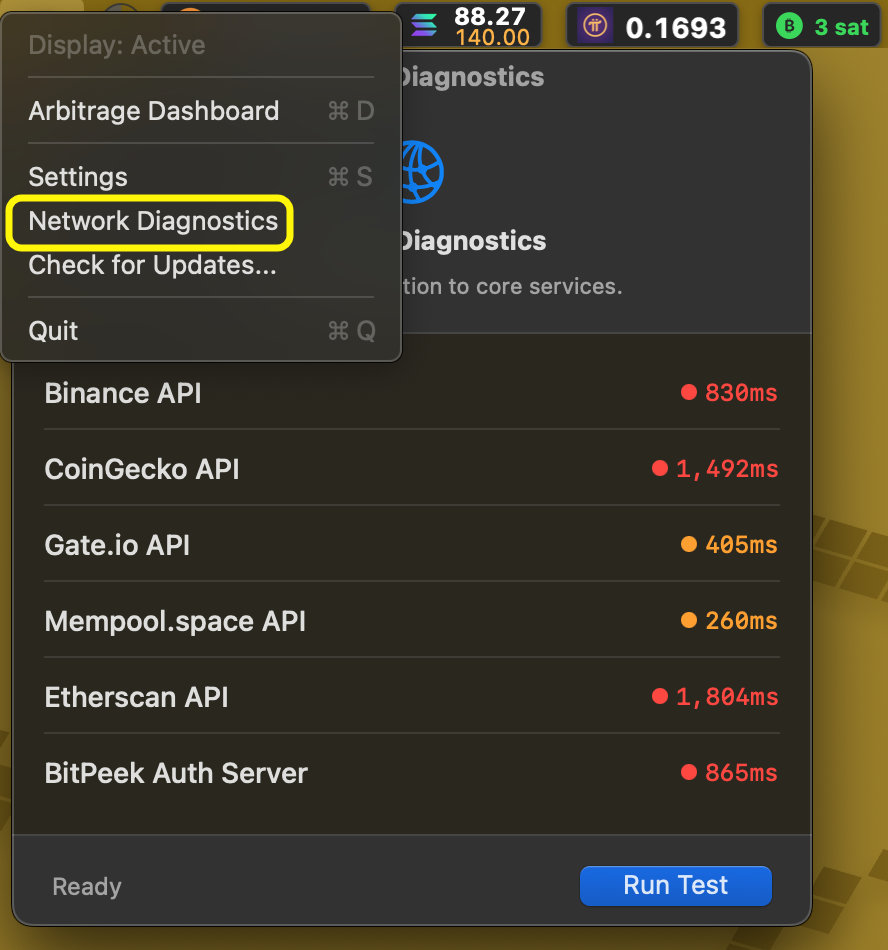
-
API Rate Limiting: Data providers impose strict limits on how often
data can be requested. If you frequently change settings (like switching coins or
data sources) in a short period, the provider may temporarily block requests (Error
429).
Solution: Simply wait a minute or two without changing settings, and the data will resume updating automatically.
If the issue persists, Pro users can contact our technical support team for priority assistance.
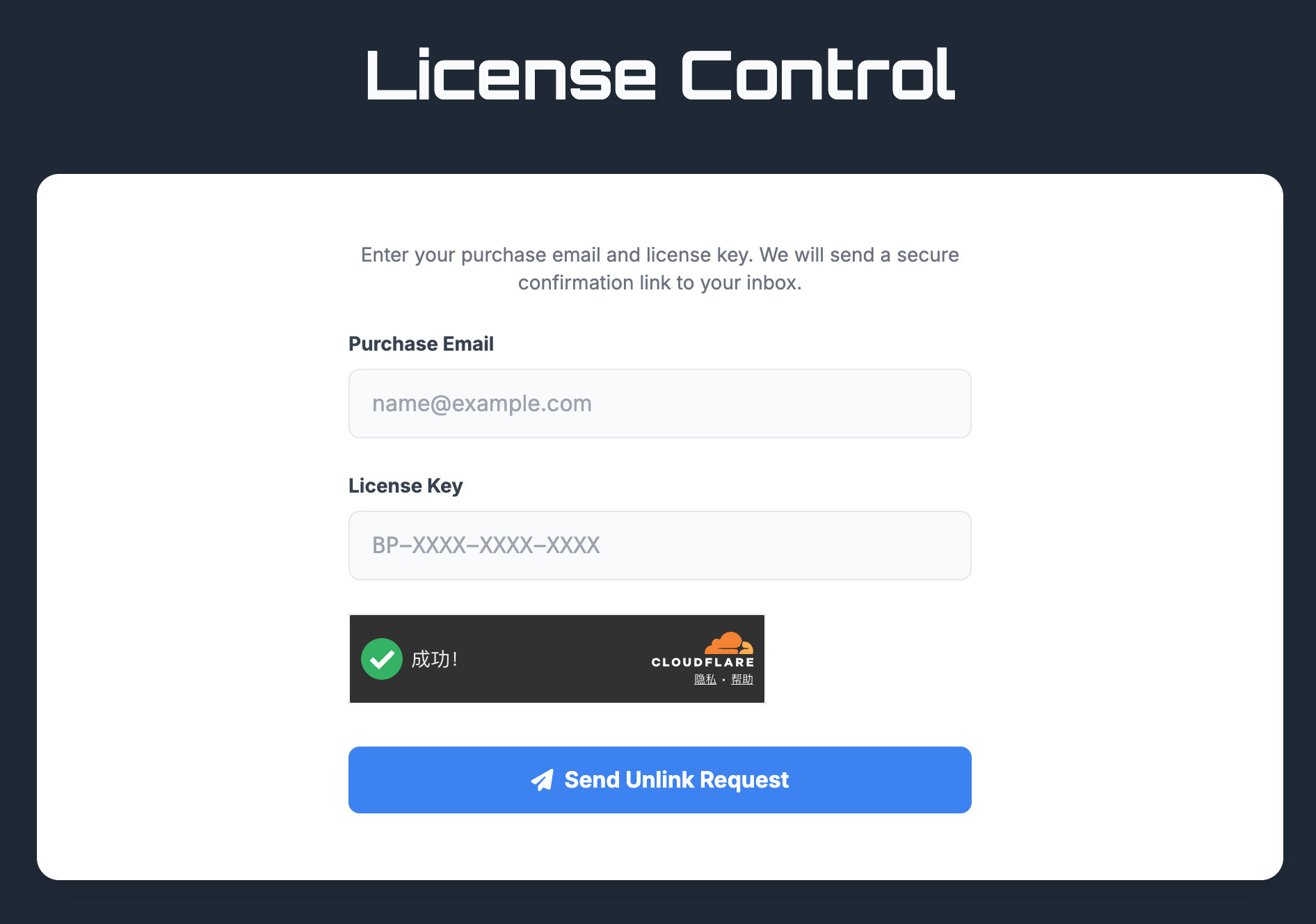
You can unlink your license from your current Mac computer via a dedicated page(License Control) on
the official website. You'll need to correctly enter the email address used to purchase
BitPeek app and the activation code. The system will then send you an email containing a
link to unlink your license. After unlink, you can activate your license on your new
mac.
The link: License
Control
There is no limit to the number of times you can unlink and
reactivate.
The image below is a screenshot.
After clicking "Buy" button and the first purchase information window pops up, click "Add discount" link on the left side, enter your discount code, and then click the "Apply" button.
Below is a demo video. (Note that the discount code in the video is for demonstration purposes only and is not valid.)
We offer a 30-day Money-Back Guarantee for all paid versions of BitPeek. If you are not completely satisfied, you may request a full refund within 30 days of purchase.
To request a refund, please email our support team at support@bitpeek.app. Please include your Order ID and the email address used during purchase.
Once approved, the funds will be returned to your original payment method, and your license will revert to the free Lite version. While not required, we would greatly appreciate it if you could share why the app didn't meet your needs—your feedback helps us build a better product.
Still have questions?
Can't find the answer you're looking for? Our support team is here to help!